
My Real Weekly & Monthly Reset as a Solopreneur Mom
(Simple systems that keep me out of burnout)
Prefer to watch instead of read?
I recorded a full walkthrough of my weekly and monthly reset process on YouTube.
If you’ve ever gone into a new week already feeling behind, overwhelmed, or scattered, I want you to know something upfront:
It’s usually not a motivation problem.
It’s a systems problem.
As a solopreneur and a mom, I’ve learned (sometimes the hard way) that if I don’t intentionally reset my life and business on a regular basis, everything starts to feel reactive. Tasks pile up. Decisions feel heavier. Burnout creeps in quietly.
That’s why I rely on two simple, repeatable routines:
A weekly reset
A monthly reset
Nothing fancy. No 12-app system. Just systems that support real life.
Why resets matter more than productivity hacks
Most productivity advice focuses on doing more.
My focus is on reducing mental load.
A reset isn’t about catching up on everything. It’s about:
Re-anchoring your week
Clearing mental clutter
Making sure your systems still match your current season of life
When your systems are aligned, everything else gets easier.
The task system I actually use (and why I simplified)
I used to use ClickUp.
It’s powerful. It’s robust. And for me, in this season, it was too much and unnecessary.
About six months ago, I moved my personal and business tasks into Apple Reminders, and honestly, it’s been a game changer.

Why it works for me:
Seamless Siri integration (“Hey Siri, remind me…”)
Less friction to capture tasks
Enough structure without overengineering
I organize my reminders into a few simple categories:
Weekly reset tasks
Operations tasks
Client tasks
Personal tasks
That’s it.
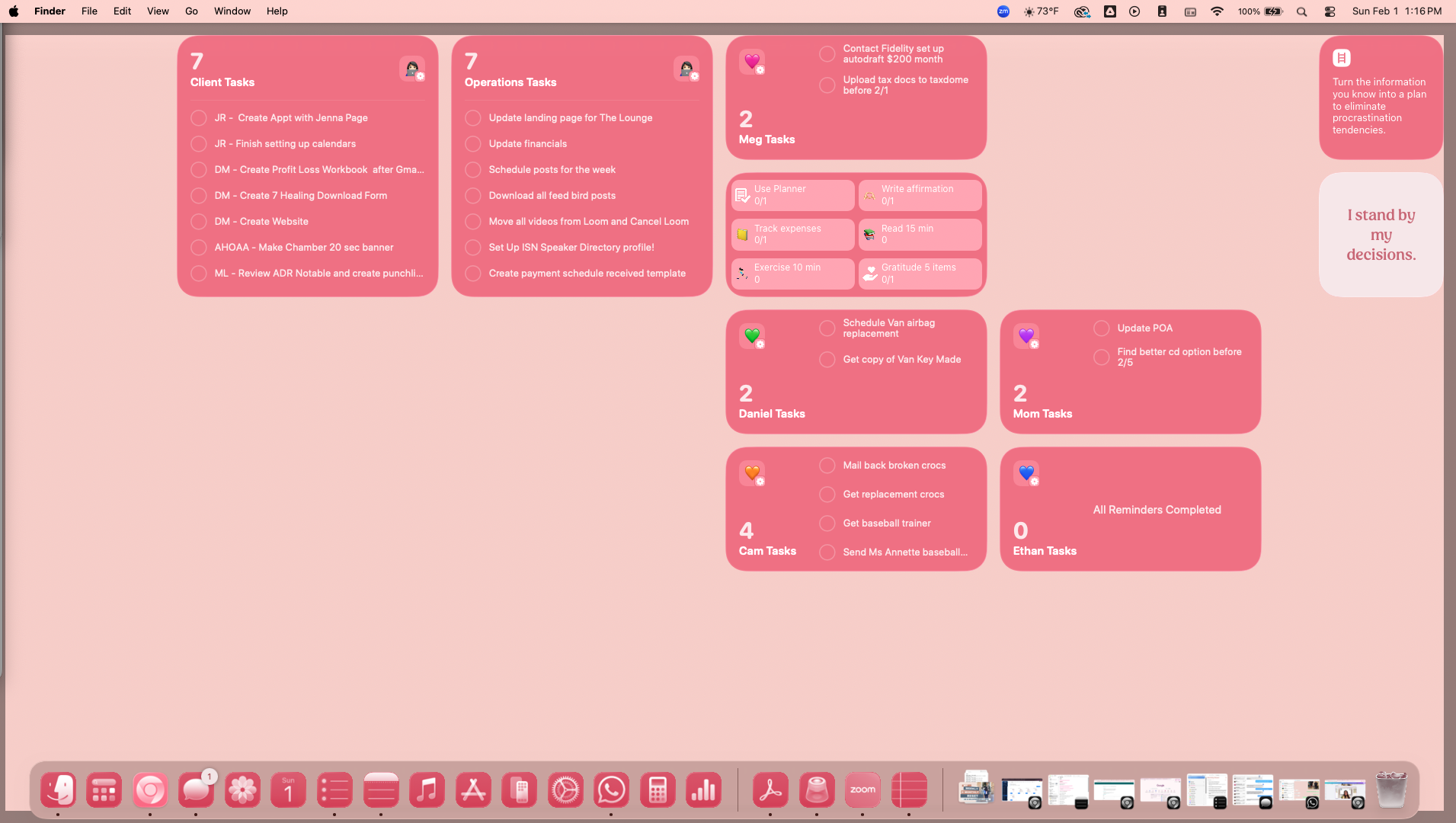
My desktop system (because being in the app alone isn’t enough)
One thing I’ve learned: digital systems work better when paired with visual cues.
On my desktop, I use simple visual “buckets” to represent different types of work. Each bucket corresponds to a task category. This gives me:
Visual clarity
A physical sense of progress
Fewer open mental loops
Everything has a place. Nothing floats around in my head.
My non-negotiable weekly reset

My weekly reset is the backbone of everything.
If I skip this, the week feels harder than it needs to be.
Here’s what it includes:
Reviewing the upcoming week on my calendar
Confirming school drop-offs and pick-ups with my husband
Light email cleanup (not inbox zero — just enough)
Making sure key tasks are captured and prioritized
It doesn’t take long, but it makes a massive difference in how the week flows.
This reset isn’t about perfection.
It’s about starting the week intentionally instead of reactively.
My monthly reset (life + business)
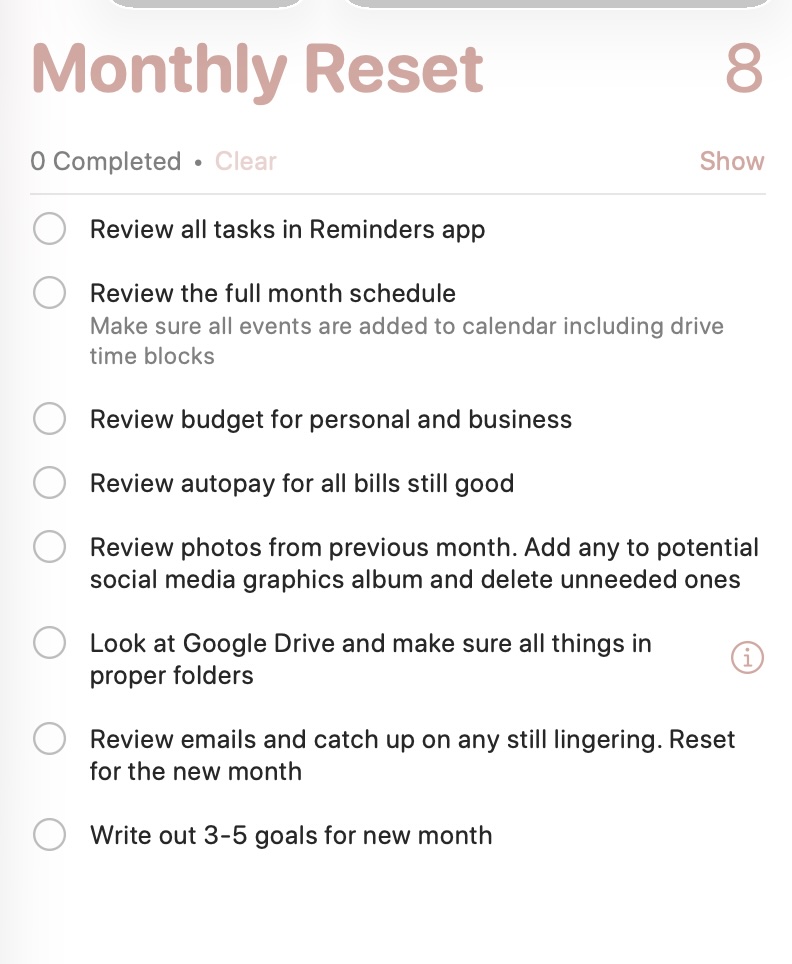
The monthly reset is where I zoom out.
This usually happens at the end or beginning of a month and includes:
1. Reviewing all tasks
Life happens. Sometimes tasks don’t get marked complete. This is my chance to clean that up and reset mentally.
2. Reviewing my full calendar
I check:
Appointments
Drive time blocks (because forgetting those causes instant overwhelm)
Personal and business commitments
3. Reviewing budgets and autopay
Both personal and business.
This includes checking for:
Autopay issues
Any changes needed (especially after things like fraud or card changes)
4. Reviewing photos from the past month
This is one of my favorite, unexpected reset steps.
I:
Delete duplicates
Identify photos I might use for content or B-roll and add them to folder
Clear visual clutter from my phone
5. Tidying Google Drive
I make sure files are:
In the right folders
Labeled clearly
Not just floating in “Recent” or "Downloads"
6. Setting 3–5 monthly goals
Nothing overwhelming.
Just clear, realistic priorities that align with my current season.
What this reset is not
This isn’t:
A hustle routine
A rigid checklist you must follow perfectly
A one-size-fits-all system
It is:
Flexible
Human
Designed to support your real life
If your reset feels heavy, it’s too complicated.
Final thoughts
The goal isn’t to have the most impressive system.
The goal is to have a system that lets you breathe.
If you don’t currently have a weekly or monthly reset, start small. Pick one or two steps. Make it repeatable. Let it evolve.
And if you want to see exactly how this looks in real life, the video at the top of this post walks through everything step by step.
👇 I’d love to know:
What’s one thing you include (or want to include) in your weekly or monthly reset?
—
If you’re a solopreneur who feels maxed out by scattered systems and wants support simplifying things, you don’t have to do it alone. If you’re not sure where to start, that’s exactly what I help with.